Secure Connect Timelines and Updates
VPN Access Groups
Connection Deadline
Beginning Monday, April 13, 2026, most Faculty, Staff, Affiliates, and Guests will be required to use the new VPN “secure‑connect” connection groups to connect to the campus VPN.- secure-connect-allthru
- secure-connect-split
After this date, the 2-step groups will no longer be available to users who are required to follow the new security compliance. We are closely coordinating this change with departmental IT leadership. To minimize disruption, departments may phase the enforcement of their users.
Does This Apply to Me?
All Faculty, Staff, Affiliates, and Guests will be required to use the Secure Connect VPN connection groups moving forward. IT Services is working closely with Department IT leadership, and your enforcement date may be after April 13 depending on your department. Please consult with your Department IT for more information about your specific enforcement timeline.
Students are not included in this mandate at this time.
Using the VPN Connection Groups
- Open up your VPN Client.
- In the window that opens, enter vpn.ucsd.edu into the box for access to campus resources, then click Connect.
- Select one of the “secure-connect” VPN connection options instead of “2-Step Secured”:
- secure-connect-split
- secure-connect-allthru
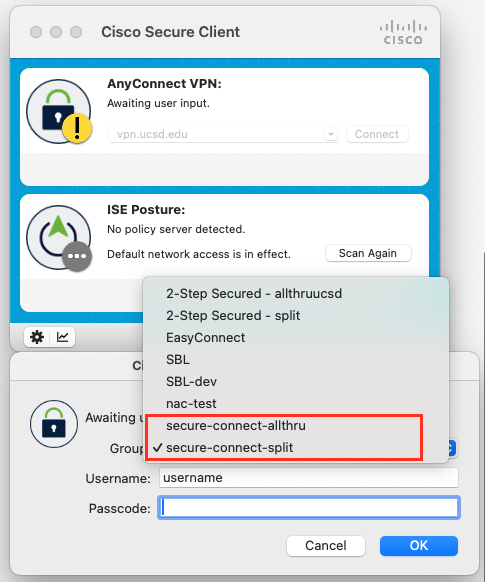
- Authenticate using Duo.
- Connecting to one of the Secure Connect connection groups will confirm whether your computer is already compliant. If you are able to successfully connect to the new group, you are all set!
- Note: If your computer is managed by your department, your computer is most likely already compliant.
- If you receive a prompt indicating that you are not compliant, please follow the instructions in the pop up to download the following:
- Qualys vulnerability management
- Trellix endpoint detection
- Contact your Department IT or the ITS Service Desk to resolve any outstanding issues or concerns.
You can find instructions on how to use the VPN for the first time on our article, Configure VPN Client on your Computer, Tablet, or Phone.
Questions?
Contact your local IT support team or visit https://support.ucsd.edu/its/.