Campus Class List
The Campus Class List report is used to provide class lists each term for UCSD and its Professors. It will show which students are enrolled in the various classes, the colleges they are from and what their major is.
The Campus Class List is available from the Business Analytics Hub (bah.ucsd.edu) under the Enrollment & Grades tab in card view, or category in list view.
In addition to viewing lists of enrolled students, the report will also allow the user to see information about the various classes being offered. Some of the information available is what classes are offered, where the classes are located, what time the class is, how many units and who is teaching the class.
Some sample uses of the Campus Class List report are:
- A list of students and their majors that are enrolled in a particular class.
- A list of students on the waitlist for a particular class.
- Which courses a student has completed.
Report User Guide
For tips and information on how to run reports, please review the Enrollment and Grades Reports, Get Started and Student Operational Reporting Help pages.
Access
When requesting access to this report, please select the "Enrollment and Grades" reporting category in the report access request.
Please see Requesting Access to Student Reports on the Get Started page for more information.
Before access can be requested, the following UC Learning trainings are required:
- FERPA - Confidentiality of Student Records and Privacy Rights
- Privacy at UC San Diego (or Privacy 101)
- UC San Diego Business Analytics Hub Fundamentals
Once the trainings have been completed, please allow at least 24 business hours for the data to update then submit the Student Reporting Access Request SNOW form.
Student Class Enrollment Status (Waitlist vs Enroll)
One Report, Many Options
The Campus Class List report is designed to support multiple use cases within a single report. In addition to providing a list of students currently enrolled in a course or class section, the report can also be used to generate waitlist and drop/withdrawn student lists based on selected filter options .
Student Class Enrollment Status Category
The " Student Class Enrollment Status Category" field controls which enrollment statuses are included in the report. By adjusting this setting, users can tailor the report to meet different reporting needs.
Common Report Uses and Recommended Settings
| Type of Report | Description | Recommended Settings |
|---|---|---|
| Class List | List of students currently* enrolled in the class. | 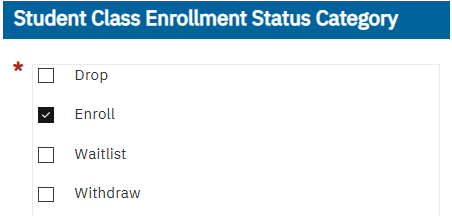 |
| Waitlist | List of students who are* (or were*) on the waitlist for the class section. | 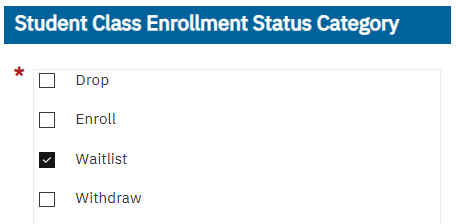 |
| Drop/Withdrawn List |
List of students who were previously enrolled in the class section but have since dropped or withdrawn. Drop: Student left one class Withdraw: Student left for the term. |
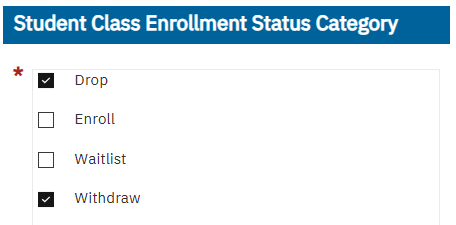 |
Note: The " Student Class Enrollment Status Category" field supports multiple selections. For example, selecting both Enroll and Waitlist will return a combined list of enrolled and waitlisted students.
*See Data Refresh and Timing.
Filtering by Enrollment Status Date/Time
Interpreting the date and datetime fields:
Student Class Waitlist/RegAudit Update DateTime:
- For students on a waitlist: This date shows the most recent time they were added to a class section waitlist.
- For all other cases: This date reflects the most recent Registration Audit (Reg Audit) activity.
- Activities that update the Reg Audit date include: enroll, drop, grade option change, number of units change, receiving a grade.
Student Class Enrollment Effective Date:
This is the effective date of the enrollment/drop/change. In most situations this date will match the Student Class Waitlist/RegAudit Update DateTime. If a retroactive change was processed, this is the effective (not system) date of the change.
How to interpret this date over time:
- During the current term: The date will often reflect a waitlist, enrollment, or drop action.
- As the term progresses or after it ends: The date will more frequently reflect other activities, such as when a grade is recorded.
- For prior terms: This date typically reflects when grades were processed for the student.
*See Data Refresh and Timing.
Data Refresh and Timing
When using this report to manage or monitor course enrollment, it is critical to be aware of the timing limitations.
Key Points To Know
- Enrollment data is current as of midnight on the prior day, and the data refreshes daily.
- Waitlist data is currently updated in near real-time. This currently creates a gap in which students that have dropped off a waitlist won't appear as enrolled until the data updates the following business day. This will change starting FA26, please see below.
- 2025-2026 Academic Year (including Summer 2026): Enrollment is as of midnight, Waitlist is near real-time.
- FA26 (transition period): Due to scheduled system maintenance, both Enrollment and Waitlist data is captured between 9:00pm-10:00pm. Changes after 9:00pm may not be reflected in the report until one additional business day has passed.
- 2027 Academic Year (and beyond): Both Enrollment and Waitlist is as of midnight. This means that enrollment or waitlist changes made today will be reflected in the report tomorrow. Real-time enrollment and waitlist information can be found within TSS.
Non-Census Data
The data in this non-census version of the report updates nightly and will continue to update even after the 3rd Week census date.
There is another report available that does not update enrollment data after the 3rd week, this is called the Campus Class List 3rd Week report.
Field List
QueryLink field names not listed in the table below were not migrated. The fields removed were carefully assessed and approved for removal by the data steward, considering factors such as data privacy, relevance, and applicability to general report usage. If any of the removed fields are needed, please submit an enhancement request and describe why the information is needed and how it will be used.
Definitions In Activity Hub Field List
For definitions for these fields, please use the Activity Hub Field List dashboard. Definitions are being added and updated on an ongoing basis. They will continue to appear as they are confirmed by the Student Activity Hub Data Definitions Committee.
| Field Name | SAH Field | Comments |
|---|---|---|
|
Term |
Term Code |
|
|
NEW Field!!! |
SIS Data Source |
Learn more about New Feature: SIS Data Source. |
|
NEW Field!!! |
Student Count |
This is a distinct count of students that match the information in that row of the report. |
|
Section ID |
Class Section ID |
|
|
Section Code |
Class Section Number |
|
|
New Filter!! |
Course Subject Code and Number |
Calc: Modified to align with TSS formatting regardless of source system. |
|
New Filter!! |
Event Package Component |
Calc: Allows you to filter between viewing all Event Package Components or just the Primary Component. |
|
Subject Code |
Course Subject Code |
|
|
Course |
Course Number |
Calc: Modified to align with TSS formatting regardless of source system. |
|
Course Title |
Course Title |
|
|
Section Subtitle |
Class Section Subtitle |
|
|
Department Code |
Course Department Code |
|
|
Course Academic Level |
Course Level |
|
|
Units |
Attempted Units |
|
|
NEW Field!!! |
Grade Option Name |
|
|
Primary instructor |
Primary Instructor Full Name |
|
|
NEW Field!!! |
Primary Instructor Email Address |
|
|
Co-instructor |
Class Section Co-Instructor Names |
|
|
Instruction Type |
Instruction Type |
|
|
Enrollment Quantity |
Enrollment Count |
|
|
Section Capacity |
Class Section Enrollment Limit |
|
|
PID |
Student PID |
|
|
Name |
Student Full Name |
|
|
Gender |
Gender Derived |
|
|
College |
College |
|
|
Student Department Code |
Student Primary Major Department Code |
Calculated field based on the student's level that term. |
|
Primary Major |
Student Primary Major Code |
Calculated field based on the student's level that term. |
|
NA—NEW!! |
Student Secondary Major Department Code |
Calculated field based on the student's level that term. |
|
NA—NEW!! |
Student Secondary Major Code |
Calculated field based on the student's level that term. |
|
Minor |
UG Primary Minor Code |
|
|
NA—NEW!! |
Student Class Enrollment Status Category |
Calculation inputs the "Waitlist" value when a student is on the waitlist. Otherwise provides the regular Student Class Enrollment Status Category value per SAH. |
|
NA—NEW!! |
Student Class Waitlist/RegAudit Update DateTime |
Calculation: If the student is on the waitlist, this is the Waitlist DateTime Current. If the student was ever enrolled, this is the Student Class Enrollment Status Last Update DateTime (most recent Reg Audit date). |
|
Class Enrollment Status Date |
Student Class Enrollment Effective Date |
|
|
NA—NEW!! |
Waitlist Position Current |
|
|
NA—NEW!! |
Student Class Section Drop Date |
|
|
Academic Level |
Student Level ID |
|
|
Class Level |
Student Classification |
|
|
Proposed Graduation Term |
Intended Graduation Term Code Current |
|
|
NA—NEW FIELD!! |
Applicant Type |
|
|
Confidential Code |
Release Restriction Confidential Codes |
|
|
Email address |
Campus Email Address |
|
Release Notes & Communications
| Date | Release Notes & Communications |
|---|---|
| 8/28/2026 |
Retrofit to incorporate TSS data released. |
| 7/9/2026 |
Added "Student Count". This is a distinct count of Students and can be used to get a dynamic count of students based on the other information and filters in your report. |
| 2/20/2026 |
Enhancements implemented to enable waitlist reporting and filtering by primary or secondary major/minor. |
| 7/14/2025 |
Initial version of the report released. |