Campus Course Information
Campus Course Information is used to generate a list of courses and whether or not they require a final exam, to view co/prerequisites for courses. Current as well as historic versions of courses are available.
Coming Soon!
These reports are coming soon. Click the link below for the release schedule.
The Campus Course Information report provides insight into current and historic versions of courses.
Some sample uses of the Campus Course Information report are:
- To view when a course was last offered
- To compare current and historic versions of a course
- To review the Pre/Co-Requisites for a course
- To generate a list of courses with final exam requirements
The Campus Course Information report will be available from the Business Analytics Hub (bah.ucsd.edu) under the Classes tab in card view, or category in list view.
Report User Guide
For tips and information on how to run reports, please review the Classes, Get Started and Student Operational Reporting Help pages.
Access
When requesting access to this report, please select the "Classes" reporting category in the report access request.
Please see Requesting Access to Student Reports on the Get Started page for more information.
Before access can be requested, the following UC Learning trainings are required:
- FERPA - Confidentiality of Student Records and Privacy Rights
- Privacy at UC San Diego (or Privacy 101)
- UC San Diego Business Analytics Hub Fundamentals
Once the trainings have been completed, please allow at least 24 business hours for the data to update then submit the Student Reporting Access Request SNOW form.
Associated Courses (ie. Pre/Co-Requisites)
Please review the information below which is critical to understanding this report.
Associated Courses
There are different types of relationships between courses. Some of the most common include:
- Corequisites
- Prerequisites
- Crosslisted (Not currently available in Campus Course Information report)
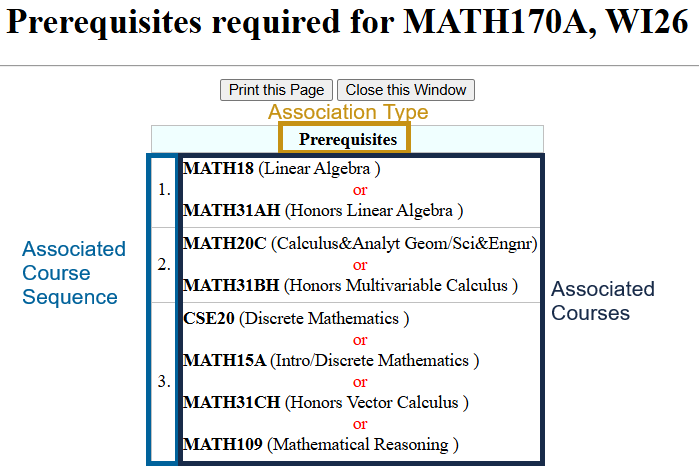
The initial version of the Campus Course Information report includes only Corequisite and Prerequisite association types. When running the report, there is an "Association Type" filter that can be used to display only Prerequisites or only Corequisites.
NOTE: Students with questions about associated courses should contact the course department.
Associated Course Sequence
Some types of course associations may have an order or grouping to them. The Associated Course Sequence field will show the grouping and order they come in.
More specifically, prerequisites have multiple types of courses required to have been previously completed. Sometimes multiple courses will meet each type.
Corequisites
These are typically courses that are intended to be taken concurrently with the selected course. An example could include a separate lecture course and lab course.
Prerequisites
Typically, these are courses that must be completed and passed prior to enrolling in the desired class. While there are prerequisites that can be taken concurrently with the desired class, this is uncommon.
Querylink Field Mapping
QueryLink Field Names not listed in the table below were not migrated. The fields removed were carefully assessed and approved for removal by the data steward, considering factors such as data privacy, relevance, and applicability to general report usage. If any of the removed fields are needed, please submit an enhancement request and describe why the information is needed and how it will be used.
Field mapping coming soon!
Release Notes & Communications
| Date | Release Notes & Communications |
|---|---|
| TBD |
Initial version of the report released. |