Chapter 8: Resolving Unprocessed Costs in PPM
Last Updated: March 18, 2026 7:16:50 PM PDT
Give feedback
Resolving Unprocessed Costs in PPM
PPM Cost has embedded controls to ensure accurate financial accounting. When Costs are Imported to PPM, if any costs fail, they are reflected as Unprocessed Costs. There are various reasons why Costs fail and various ways to correct. The business owner of the cost is responsible for correcting the error or the cost timely to ensure proper recording and accounting. Only central offices can correct unprocessed costs in PPM.
The Project team is working with ITS and Oracle to streamline the current error resolution process.
- Error Resolution Process:
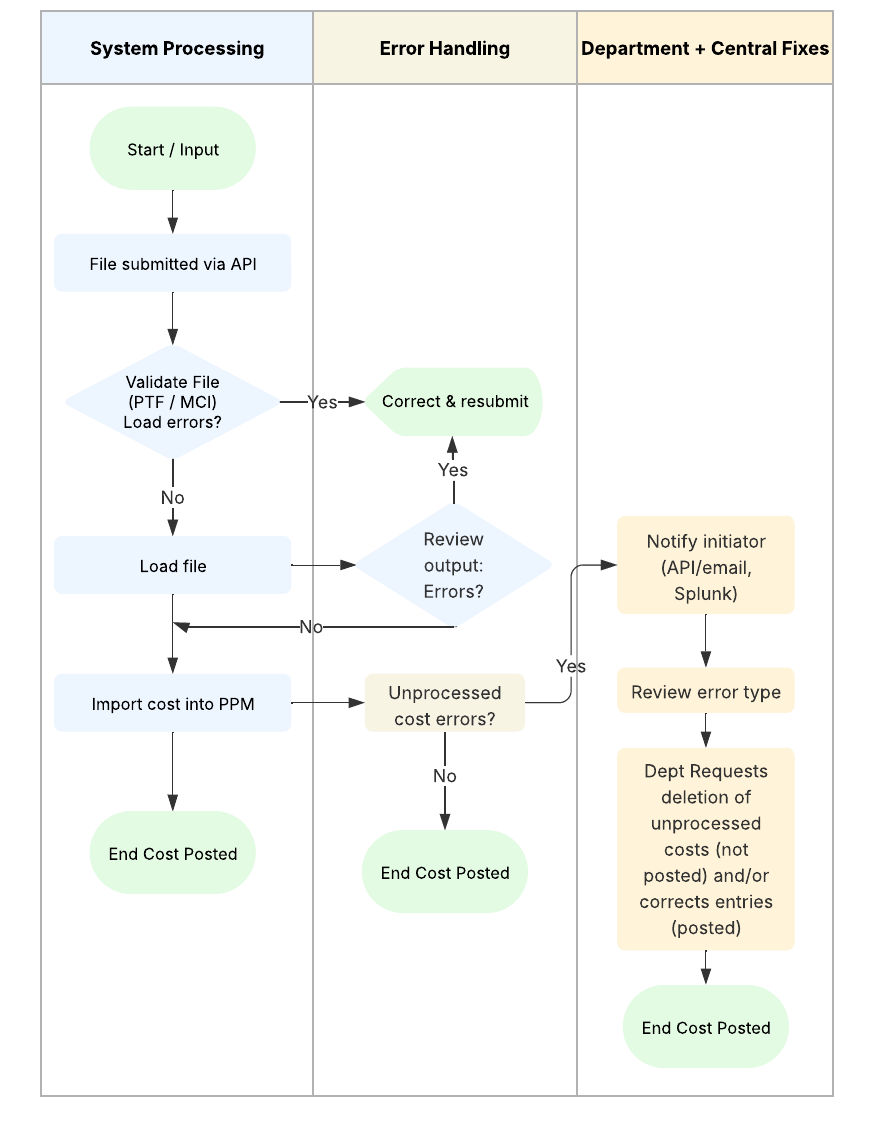
- Visit the Understanding and Resolving PPM MCI Import Errors page published in Collab for information on errors and how to correct them:
https://ucsdcollab.atlassian.net/wiki/spaces/ESRFIS/pages/15077614/Understanding+and+resolving+PPM+MCI+import+errors
- Refer to knowledge based article number KB0033521, Understand How to Process Recharges in Recharge Plus:
https://support.ucsd.edu/financeid=kb_article_view&sys_kb_id=407385ab1bd10914b8d255b5604bcbe9
Find answers, request services, or get help from our team at the UC San Diego Services & Support portal.