Letters & Metered Mail
Ensure your outbound letters are processed without delay by adhering to U.S. Postal Service (USPS) automation standards and university recharge requirements. Review this page for mandatory address formatting guidelines and the required barcoding process, which ensures accurate and cost-effective recharge data capture for your department.
Barcoding Letters
With the introduction of the new chart of accounts, Logistics requires barcoding to capture recharge information for outgoing mail. The new account structure consists of three account fields. Barcoding provides a reliable, accurate, and cost-effective means of capturing this data.
There are two ways to barcode recharge numbers for outgoing mail:
Option 1: Print Barcode Labels for Individual Letters
- Log in to the Metered Mail Barcode Form using your Single Sign-On (SSO).
- Select Label Sheet - Avery 1/2" x 1-3/4" Blank Rectangle Labels.
- Enter your Project Number, Task Number, and Funding Source (if applicable).
- Submit the request and print the resulting PDF onto the Avery labels.
- Apply the barcode to your letter.
Barcode Placement Rules
- DO NOT place the barcode in the bottom right corner of the envelope, as this space is reserved for USPS routing barcodes.
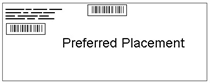
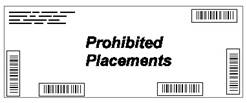
NOTE: You can submit a barcode request for each unique POETAF combination and reprint at any time by viewing your profile history within the Logistics Portal.
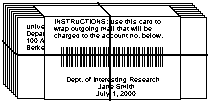
Option 2: Bundle Mail Using a Barcoded Sheet
- Log in to the Metered Mail Barcode Form using your SSO.
- Select Label Page for Metered Mail Bundle.
- Enter your Project Number, Task Number, and Funding Source (if applicable).
- Submit the request and print the resulting Barcode PDF.
- Securely bundle your metered mail and place the printed barcode facing sheet on top.
Address Format Guidelines
The USPS recommends the following format on all mail to U.S. destinations. Ensure labels are printed straight, as mail processing machines cannot read slanted information.
Sample Address:
| Line 1 | JANE L MILLER |
| Line 2 | MILLER ASSOCIATES |
| Line 3 | STE 2006 |
| Line 4 | 1960 W CHELSEA AVE |
| Line 5 | ALLENTOWN PA 18104 |
Addressing Best Practices
- Use all capital letters.
- Use a simple font in at least 10-point type.
- DO NOT use commas or periods.
- Use one space between the city and state, and two spaces between the state and ZIP code.
- DO NOT place any information (logos, slogans, or attention lines) below the city, state, and ZIP code line.
- Use black ink on white or light paper. Do not use reverse type (white printing on a black background).
- If using address windows, ensure there is at least 1/8-inch clearance around the address text.