UC San Diego
Faculty and Staff
Site Search
Blink Logo
A-Z Sites Department Index
  • Blink Tabs
    • Buy & Pay
    • Facilities & Services
    • Faculty Resources
    • Finance
    • Human Resources
    • Research
    • Safety
    • Student / Class Info
    • Technology
    • Travel
  • Personal Tools
    • At Your Service via AYSO
    • At Your Service via SSO
    • Compensation Calculator
    • Enrollment Central
    • Job Bulletin
    • My Directory
    • My LeaveBalances
    • My Time
    • My Training
    • My Travel
    • SkillSoft eLearning
    • All tools
  • Business Tools
    • APOL
    • Connexxus
    • Marketplace
    • Title & Pay Look-up
    • MyApprovals
    • MyDashboard
    • MyEvents
    • MyFunds
    • MyTravel
    • EmployeeLink
    • FinancialLink
    • TravelLink
    • All tools
  • Instruction Tools
    • ASSIST
    • Class Lists
    • Degree Audit (DARs)
    • Find a Student
    • Majors List
    • Minors List
    • Schedule of Classes
    • Enrollment and Waitlists
    • WebCT
    • All tools
  • Research Tools
    • Proposal Repository
    • Faculty Expertise
    • Forms lister
    • Get Proposal #
    • Shared Facilities
    • FinancialLink
    • TravelLink
    • MyEffort
    • MyFunds
    • My Research Safety
    • MyTravel
    • All tools
  • Blink Home 
  • Student / Class Info 
  • Resources & Tools 
  • Signing On to Tools

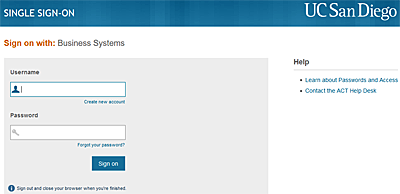
How to Sign On to Student/ Class Tools

Last updated November 2, 2009 10:50:53 AM PST
Give more feedback
single signon

If you work with students and need to access the Student/ Class tools, find out how to sign on.

Expand all

1. Sign in to the tool you need.

  • Go to the Blink Tools page and choose the tool you need under "Instruction tools."
  • When prompted, enter your user name and password.
  • Read the security instructions and click Sign In.

Note: You can move between tools without signing in each time.

2. If you receive an error message or can't get into the tool, check these potential problems.

  • Forgot your password?
    (Note: Also use these instructions to reactivate your account if you receive a message that your account has been suspended.)
  • Need to reset your password?
  • Need to look up your official UCSD e-mail address? Use the campus directory.
  • Need to register for a new account?

3. If you still can't get in, get help.

  • Contact one of these resources:
    • Your DSA
    • ACT Help Desk, (858) 534-1853

Expand all

If you need help, contact your DSA or the ACT Help Desk, (858) 534-1853.

Student / Class Info

Resources & Tools

  • Academic Calendars
  • Advisor Lists
  • Enrollment and Registration Calendars
  • General Catalog
  • Instructional Materials for Faculty
  • Signing On to Tools
  • Enrollment & Academic Forms
UC San Diego 9500 Gilman Dr. La Jolla, CA 92093 (858) 534-2230
Copyright ©2009 Regents of the University of California. All rights reserved.
  • Terms & Conditions
  • Feedback
  • About Us
  • Accessibility
  • Emergency Info