Identification Tags and UCID Numbers for Inventorial Equipment
Find out how UCID numbers are assigned, your responsibility to affix asset tags, and learn about the Asset Locator Report.
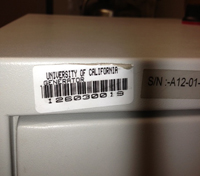
All inventorial equipment at UCSD, no matter who has title to it, should have an UCID tag affixed to it. Printed on the tag is a barcode, a brief description of the equipment, and the equipment's UCID number. The UCID number is a unique 9 digits number, no alpha charcters. The UCID property tag should remain on the equipment throughout its life-cycle with UC San Diego.
What to Do With the UCID Tags
Equipment Management will mail you the tags stapled to an Asset Locator Report. Follow these steps:
- The Asset Locator Report is emailed to the equipment custodian at the end of the month and lists all new equipment required to be tagged. A paper copy is included with the asset tags via campus mail.
- Follow the instructions on the asset locator report.
- Verify the information on the Asset Locator and update the asset detail in CAMS. It is the department's responsibility to update the CAMS record with additional information such as actual location, serial number, PI/custodian, etc.
- Affix the tag to the front surface of the equipment for easy visibility.
How to get tags
OFC Procurement- If you purchase inventorial equipment through OFC Procurement, it will be processed through Oracle FA (Fixed Assets) once it is fully paid and sent to CAMS.
Once you receive a piece of inventorial equipment and have not yet received tags:
- Please make sure your assets are in CAMS by running an asset report by PO/Reference Number.
- If the search does not return a result please contact Equipment Management immediately with the Purchase Order or Invoice number so we can create the asset in Oracle FA together, where it will then be sent to CAMS.
- Once we assign an Asset/UCID number we will mail you an asset tag. Remember, it is required by UCOP and Uniform Guidance that UC San Diego track assets for inventory control and reporting. Thank you again for your patience.

If you purchased equipment from UCSD Bookstore:
- Equipment Management is notified automatically on a daily basis and we create the asset manually in CAMS and send the UCID tags to you via campus mail.
- The information is entered into CAMS, a UCID number is assigned to the equipment, and tags are issued to your department via campus mail, with an Asset Locator Report.
If you acquire the inventorial equipment via loan or transfer:
- Submit a Service & Support request. Feel free to complete an EIMR (PDF) and attach it to the request.
- Follow the instructions on How to Handle Equipment Acquired as a Loan or How to Handle Equipment Acquired as a Transfer.
Asset/UCID number
For inventorial equipment acquired prior to July 2023, the Asset/UCID number is a nine-digit number that, when broken down, identifies the following:
- First pair of digits indicates the calendar year the equipment was acquired.
- Second pair of digits identifies the campus that originally acquired the equipment.
- Last five digits designate the sequential placement of the equipment in CAMS.
For inventorial equipment acquired beginning July 2023, the Asset/UCID number is a ten-digit next up number, with no identifying details.
Government tag
 If the government furinshed equipment for use at UC San Diego the title of the equipment is with the government. That agency should have its own asset tag affixed to the equipment. This equipment must be recording in CAMS and we will send you an asset tag identifying the equipment as Gov't property. This tag looks the same as the UCID tag, but has "GOVT PROPERTY" printed on it as well.
Request duplicate or replacement tags
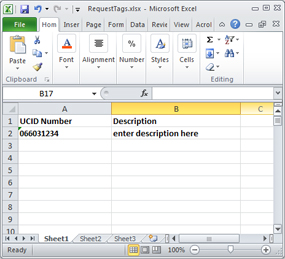
Email Equipment Management or submit a Service & Support ticket with the Subject of Request UCID Tags. Attach a simple Excel spreadsheet with two columns: the UCID number and the description. Download an example spreadsheet here. In the body of the email, indicate the name and mailcode of the person who should receive the tags.
Find answers, request services, or get help from our team at the UC San Diego Services & Support portal or call the Finance Help Line at (858) 246-4237.