Staff/Faculty Employment Validation
Read about the Employment Validation tool, used by departments that provide services to staff or faculty.
Departments that provide services to staff or faculty need to verify employment status. Previously, departments checked for a current validation sticker on the back of the employee ID card. Now, the Employment Validation tool accomplishes this task. Validation stickers are no longer issued.
Note: Employees whose ID cards still have a Social Security number instead of the employee ID number should fill out an ID Card Request Form to obtain a new ID Card. Once reviewed by Campus Card Staff, you will receive an email with instructions to schedule an appointment to pick up your ID Card.
Check ID
To check an ID card, go to the:
Note: If your browser has a pop-up blocker, you may need to hold down the Ctrl key as you click the link to access the tool.
You'll find:
- A box where you enter the employee ID number
- A submit button
Check employment status
You can check the employment status in 2 ways by:
- Entering the employee ID number
- Swiping the employee's ID card with a magnetic stripe reader
You will get 1 of 3 responses from the tool:
- YES - INDIVIDUAL IS A CURRENT EMPLOYEE
- NO - INDIVIDUAL IS NOT A CURRENT EMPLOYEE
- INVALID FORMAT
Note: UCSD Retirement Association members' ID cards will continue to use validation stickers. Service departments should honor these cards (which look similar to staff ID cards) as long as the sticker is current. Address questions to Suzan Cioffi, (858) 534-4724.
Magnetic stripe readers
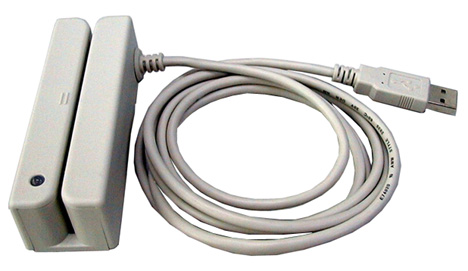 If your department has a high volume of employee status checks, a magnetic stripe reader may be useful. When attached to your computer, the reader allows you to swipe the card instead of entering the PID manually.
We have tested the following magnetic strip readers:
| Name | Part number | Type | Capability |
|---|---|---|---|
| UNITECH MSR 200 | MSR200-33USB | USB Mag Stripe | Not programmable |
| IDTECH EASYMAG | IDT-WCR3331-33QU | USB Mag Stripe | Programmable |
| IDTECH OMNI | IDT-WCR3237-633U | USB Mag Stripe/Bar Code | Programmable |
Note: These readers are compatible only with Windows operating systems 98, ME, 2000, and XP, as well as any Macintosh operating system with USB capability.